LunchEAZE Core & Core XL
User manual
How to charge Core, set the hours until your meal, choose a heat level, read the lights and the display, look after the container and battery, and what to do when something looks wrong. Core and Core XL have the same controls; the XL has the larger container and battery.
Download the PDFQuick-start card (PDF)Version 2026-10 · firmware V1.1
What's in the box
- LunchEAZE Core base (or Core XL), with the replaceable battery fitted.
- Meal container: 4 cups (940 mL) on Core, 6 cups (1,400 mL) on Core XL. Food-grade 304 stainless steel with a polypropylene lid and silicone seal. Spare lids are sold separately: spare lids.
- Core charger, 12V. The label on the charger says which model it is for; chargers are not interchangeable between LunchEAZE models.
- Quick-start card and the safety insert.
The insulated bag is sold separately for Core (see Insulated bag). Missing or damaged on arrival? Contact us with your order number and a photo.
Buttons, lights and display

| Button | What it does |
|---|---|
 Power Power | Tap to turn Core on. Hold until the display says OFF, then release, to turn it off. Power is also the only button that works while Core is heating. |
 Left Left  Right Right | Move between the four menus along the bottom of the display. They do nothing while a value is being edited. |
 Up Up  Down Down | Change the value you are editing: half an hour per press in Hours Until Meal, 2 degrees per press in Max Heat Level (hold to run quickly). |
 OK OK | Edit the menu you are on (its icon blinks), and press again to confirm and save. On Manual Heating, OK starts heating right away. |
The three lights
 Heating Heating | On while the hotplate is heating, whether the countdown started it or you did. |
|---|---|
 Charging Charging | Blue while charging, flashing when the charge is almost complete, green when full. It belongs to the charger circuit, so it works whether Core is on or off. |
 Auto-Heat Ready Auto-Heat Ready | Green once your hours are confirmed: the countdown is running and Core will heat on its own. It goes off when heating starts. If it is off and Core is not heating, the countdown has not been confirmed yet. |
The display
Three digits, a small bar beside Hours or °F/°C that tells you what the number means, and the four menu icons underneath. The icon of the menu you are on is lit; it blinks while you are editing.


Longer words scroll across the three digits, and a few letters are drawn with digit shapes, so START HEAT looks like "5TART HEAT". While Core is heating no menu icon is lit and the number is the hotplate temperature.
Watch: setting it up
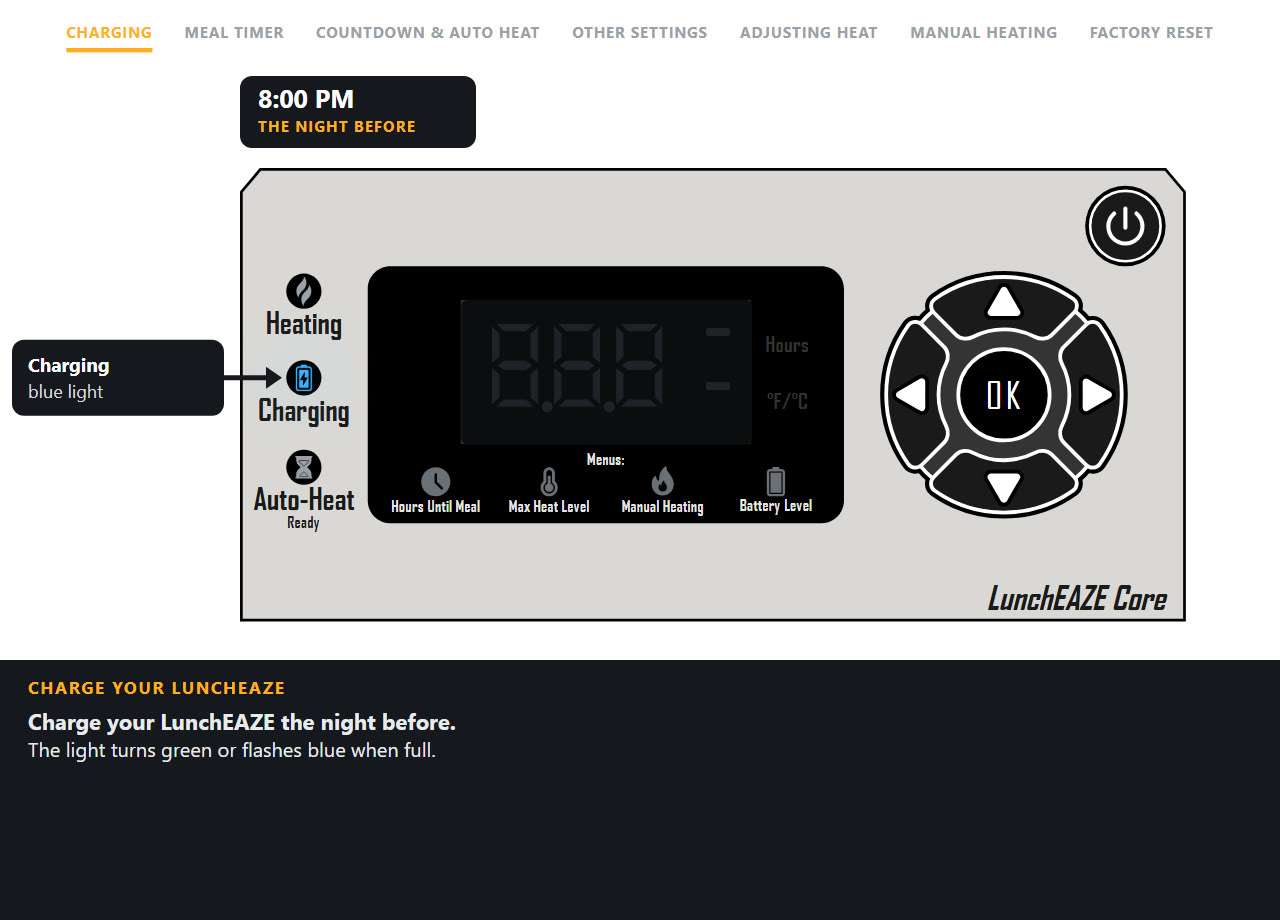
Everything on the front panel in one short film, in seven parts: charging the night before, setting a meal timer, the countdown and automatic heating through a morning, the other settings, adjusting the heat, manual heating, and a factory reset. The row across the top shows which part is playing, an orange ring marks each button press, and the clock above the panel shows the time of day.
Quick start
Pack a cold meal, tell Core how many hours until you eat, and leave it switched on. It heats itself about 2 hours before that time.
- Charge before the first use. Plug the charger into Core first, then into the wall. A full charge takes 4 to 5 hours: the Charging light is blue while charging, flashes when almost done, and turns green when full.
- Insert a container of cold food and latch it down. Press the lid on until all four latches click, then lock the container into the base.
- TapPower. Core wakes in the Hours Until Meal menu with the green clock blinking and the last hours you used on the display (3.0 from the factory).
- Set the hours until lunch withUp and Down, then press OK. Half-hour steps, from 2.0 to 24.0. Example: it's 9:00 and lunch is 12:30, so set 3.5. If you press nothing for 15 seconds, Core confirms the value on the display by itself.
- Check the Auto-Heat Ready light is on. The clock stops blinking and the display counts down. Heating starts automatically when 2.0 hours remain.
- Leave it on and go. Carry Core in an insulated bag; it heats safely inside one. At lunchtime, open the lid and eat from the container in the base. Switch Core off after eating: it keeps the meal warm until you do, and that uses the battery.
Need to eat sooner than 2 hours from now? Use Manual Heating. Most meals take 1 to 2 hours to heat through, so the countdown gives the best result whenever there is time for it.
Turning it on and off
- On: tap Power. Core opens straight into Hours Until Meal in edit mode. There is no sleep mode: the display stays on until you switch it off.
- Off: hold Power until the display shows OFF (under half a second), then let go. The display blanks and Core switches off a second later. This also stops heating.
- Keep it on for auto-heat. The countdown only runs while Core is on. If you switch it off, the countdown stops; at the next power-on it starts again from your saved hours.
- Core never switches itself off in normal use. It only does so for a low battery, a sensor error, or after a factory reset or unit change (see messages).
Charging
Charge overnight before each day you use it. A full charge takes 4 to 5 hours and heats one meal.
- Plug the charger into Core first, then into the wall outlet. The charger's own light comes on when the wall side is live.
- The Charging light is blue while charging.
 It flashes when the charge is almost complete.
 It turns green when the battery is full. Unplug from the wall first, then from Core.
Core does not charge while it is heating, even with the charger plugged in. Charge it before the day starts, or after lunch with the unit switched off. Core also heats only from its battery; plugging the charger in does not power the hotplate.
- Charge between 0 and 45 °C (32 to 113 °F). Charging is slower when the battery is very cold or Core is still warm from heating; let it come to room temperature first.
- Use only the charger supplied with your model. A charger from another LunchEAZE model or another device may not light up, may not charge it, and can create a risk of fire.
- The Battery Level menu shows FULL only when the battery is nearly full. CHARGE PLEASE means anything short of that; it does not by itself mean Core cannot heat a meal. For a reliable hot lunch, charge until the light is green.
- If the Charging light never comes on with the charger connected, check the outlet, the plug and the port (there is a small centre pin; line the plug up straight and never force it), then run the checks under Troubleshooting.
Daily use
The number you set is how many hours until you want to eat, not a delay before heating starts. Core counts down and begins heating on its own when 2.0 hours remain, so the meal is hot and ready at the time you set.
Example. You pack at 9:00 and want to eat at 12:30: set 3.5 and press OK. The Auto-Heat Ready light comes on and the display counts down. At about 10:30 heating starts, the Heating light comes on, and the display switches to the hotplate temperature. At 12:30 the meal is hot. Core remembers 3.5 for tomorrow.
Setting the hours
- At power-on the clock icon blinks and the display shows your last setting. Up / Down change it half an hour at a time, from 2.0 to 24.0. OK confirms.
- Walk away and it confirms itself. If no button is pressed for 15 seconds, Core confirms the hours on the display and starts the countdown. So simply switching Core on with its saved hours arms it. If that is not what you want, switch it off.
- To change the hours later, press OK on the Hours menu: the display shows the saved setting (not the time remaining). Confirm and the countdown restarts from the new value.
- Setting 2.0 starts heating about a minute after you confirm. The display never counts below 2.0; at that point it shows the hotplate temperature.
- The countdown is shown in tenths of an hour and counts down once a minute.
Packing the meal
- Pack food cold, straight from the fridge. Core reheats pre-cooked food; it does not cook raw food.
- Fill the container, press the lid down evenly until all four latches click, and lock the container into the base.
- Keep it upright. The container is spill-resistant when sealed, not fully leakproof, so soups and thin sauces travel upright.
- Use an insulated bag to keep the food cool until heating begins. Core does not refrigerate: avoid packing highly perishable foods for long periods.
At lunchtime
- Open the lid and eat with the container left in the base. The container and food are hot; the base only gets warm on the outside.
- The bottom heats first, so stir before eating.
- Switch Core off when you are done. It keeps the meal warm (pulsing the hotplate on and off) for as long as it is left on, until the battery runs down. Switching off after eating keeps the battery healthy and ready for tomorrow.
The four menus
Press Left and Right to move across the four icons under the display. Press OK to edit the one you are on (its icon blinks), use Up and Down to adjust, and press OK again to save. Any menu other than Hours Until Meal returns to it after 15 seconds without a press.
 1. Hours Until Meal
Sets the hours until your meal, 2.0 to 24.0 in half-hour steps. Confirming starts the countdown and turns on the Auto-Heat Ready light. Heating begins when 2.0 hours remain. See Daily use.
 2. Max Heat Level
Sets the maximum hotplate temperature: 170 to 220 °F in 2-degree steps (about 75 to 105 °C). Hold Up or Down to run through the values. The factory setting is 220 °F, the hottest. This is the plate temperature, not the food temperature; to heat the food through, the plate may run a little hotter or cooler than the number. See Heat level and hotter lunches.
 3. Manual Heating
The display scrolls START HEAT. Press OK and Core starts heating immediately, with the same heating pattern as the countdown. Most food takes 1 to 2 hours. To stop, hold Power until OFF shows and release. We recommend the countdown whenever you have more than 2 hours, because it finishes right at mealtime.
 4. Battery Level
Scrolls FULL when the battery is nearly full, or CHARGE PLEASE when it is anything less. There is no percentage. Charge until the Charging light is green before a day you need a full hot meal.
While it heats
- The Heating light is on, the Auto-Heat Ready light goes off, no menu icon is lit, and the display shows the hotplate temperature climbing toward your Max Heat Level. It does not show a time remaining.
- Only the Power button works while heating. You cannot open the menus, check the battery or change the heat level until you switch Core off.
- For the first 2 hours the hotplate heats continuously, switching off at your Max Heat Level and back on a few degrees lower. After that Core keeps the meal warm by pulsing the plate half the time, for as long as it is left on.
- The container must be latched into the base; the hotplate only reaches the food through it. Leave the container in the base while eating.
- If the battery runs down while heating, the display scrolls LO BATTERY and Core switches off. Charge fully before each use to avoid a lukewarm lunch.
Heat level and hotter lunches
Max Heat Level is the hotplate limit. 220 °F, the factory setting, gives the hottest meal. Lower it for foods that scorch easily or that you prefer warm rather than hot.
If lunch is warm but not hot enough
- Set Max Heat Level to 220 °F.
- Use the countdown rather than Manual Heating, so the meal gets the full 2 hours of preheating.
- Keep Core inside an insulated bag while it heats; the bag holds the heat in.
- Leave the container in the base while eating; Core keeps heating.
- Add a small splash of water to dry foods such as rice, pasta or sliced meats. Core works a little like a slow cooker: the moisture in the food makes steam inside the sealed container, and that is what carries the heat through.
- Soups and thick stews hold a lot of heat and are the hardest to get very hot; pack them a little less full.
- Start from refrigerated rather than frozen food. If you pack frozen food, a sprinkle of water in the bottom helps, and thawing it in the fridge overnight helps more.
- Stir before eating; the bottom is hotter than the top.
- Core heats one meal per full charge, so charge it fully the night before.
If a fully charged Core gives no heat at all, the Heating light never comes on, or the display shows SENSOR ERROR, contact us.
Container and lid

- Material. Food-grade 304 stainless steel (it contains nickel and chromium, as all 304 stainless does), with no coating. The lid is BPA-free polypropylene with a silicone sealing ring. No BPA, BPS, BPF or PFAS near the food.
- Sizes. Core: 4 cups (940 mL). Core XL: 6 cups (1,400 mL). The container must match the base.
- Sealing. Press the lid down evenly until all four latches click. The seal is snug when new and relaxes with use. Watch the 1-minute sealing video.
- Spill-resistant, not leakproof. Sealed properly it survives a backpack, but keep liquids upright.
- Dishwasher and freezer safe. The container and lid can go in the dishwasher; prep ahead and freeze meals in the container. Never microwave the container (it is steel) and never put the base in water.
- Lid pulled in after heating? That is steam suction as it cools. Lift one corner of the lid to release the seal, then open normally.
- Replacements. Extra containers and lids are in the accessories shop. If a latch, hinge or the lid is cracked, contact us.
Insulated bag
- Core is designed to heat inside a bag. An insulated bag holds the heat in and gives the hottest result, and it keeps the cold food cool before heating starts. Any lunch bag, backpack or cooler works; the outside of the base only gets warm.
- The bag is not included with Core. The LunchEAZE insulated bag (10″ × 10″ × 6.5″ for Core, larger for XL) is in the accessories shop.
- Add an ice pack beside Core on hot days if you like; keep it off the display and the charging port.
Cleaning and care
- Container and lid: dishwasher safe, or wash by hand. Dry the silicone seal before storing. No microwave.
- Base: unplug the charger and let it cool. Wipe with a damp cloth and mild soap, then dry. Never immerse the base, the cord or the plug in water, and never put the base in the dishwasher. Clean spills promptly.
- Hotplate and the inside of the base: wipe crumbs and drips out once cool. Do not scrape the plate with metal.
- Charging port: keep it clear of crumbs. Line the plug up straight with the small centre pin; if it will not seat, check for debris rather than forcing it.
- Display: a soft, slightly damp cloth. No solvents. A foggy look under the display film is harmless condensation and clears on its own.
- Do not use Core if the display is cracked, the cord or plug is damaged, or it behaves differently after a hard drop. Contact us instead.
Battery, storage and travel
- Replaceable lithium-ion battery. Core: 8,000 mAh, 59.2 Wh. Core XL: 13,600 mAh, 99.8 Wh. One full charge heats one meal, with about 2.5 hours of heating.
- Charge it like a phone. Overnight charging before each day of use is the normal routine. Switch Core off after eating rather than leaving it to keep the meal warm all afternoon.
- No early warning. Core does not show a percentage. When the battery is too low to go on, it scrolls LO BATTERY and switches off, even in the middle of heating.
- Not using it for a while? Lithium batteries can be damaged by sitting at 0% for a long time. If Core will sit unused for more than a few days, charge it to at least half first and top it up every month or two. Store it dry, at room temperature, away from heat.
- Temperatures. Charge between 0 and 45 °C (32 to 113 °F); use between −20 and 60 °C (−4 to 140 °F). Never leave it in a hot car.
- Flying. Core's 59.2 Wh battery is under the 100 Wh limit most airlines apply to carry-on devices; Core XL's 99.8 Wh is just under it. Carry it on rather than checking it, and check your airline's rules before you travel.
- Replacing the battery. The battery is a customer-replaceable module: a replacement is in the accessories shop, and a short video shows the swap. If a battery under warranty stops holding a charge, contact us before buying one.
- Disposal. Do not throw any part of Core in the trash. Recycle it responsibly with an electronics recycler.
The charger
- Output 12V DC, 2.5A, with a US plug. Input 100 to 240V, 50/60 Hz, so abroad a simple plug adapter is all you need; no voltage converter.
- Always connect the charger to Core first, then to the wall. Do not let the cord hang over a counter edge or touch hot surfaces. Unplug when not in use and before cleaning.
- The charger's own light shows the wall side is live. Core's Charging light shows the battery is taking a charge.
- Lost or damaged? A replacement is in the accessories shop. Check the label says Core before you buy: Pro, XL and Junior chargers are different, and a wrong charger can damage the unit.
What the lights and messages mean
| You see | It means | What to do |
|---|---|---|
 Green clock blinking, number + Hours Green clock blinking, number + Hours | You are editing Hours Until Meal. Always the case for the first 15 seconds after power-on. | Set the hours and press OK, or wait 15 seconds and Core confirms the value shown. |
| Green clock solid, number counting down | The countdown is running. | Nothing. Heating starts at 2.0. |
| Auto-Heat Ready on | Your hours are confirmed and Core will heat on its own. | Leave Core switched on. |
 Auto-Heat Ready off, Core on, not heating Auto-Heat Ready off, Core on, not heating | The hours have not been confirmed yet. | Press OK on the Hours menu. |
| Heating on, no menu icon, number + °F/°C | Heating. The number is the hotplate temperature. | Nothing. Only Power works now. Switch off after eating. |
 Red thermometer, blinking while editing Red thermometer, blinking while editing | Max Heat Level menu. | 170 to 220 °F, OK to save. |
| Orange flame + START HEAT | Manual Heating menu. | OK starts heating now; Left or Right to leave. |
| Blue battery + FULL | Battery nearly full. | Ready for a meal. |
| Blue battery + CHARGE PLEASE | Battery not nearly full. | Charge until the Charging light is green before a day you need a full hot meal. |
| Charging light blue | Charging. | Nothing. 4 to 5 hours from empty. |
| Charging light flashing | Almost fully charged. | Nothing. |
| Charging light green | Fully charged. | Unplug and use. |
 No Charging light with the charger connected No Charging light with the charger connected | Not charging. | Check the outlet, plug and port. Core does not charge while heating. Still nothing: see Troubleshooting. |
| OFF | Power is being held. | Release to switch off. Keep holding and add a second button only for the °F/°C or factory-reset combinations below. |
| LO BATTERY scrolling, then off | The battery is too low to continue. | Charge fully. If it happens right after a full charge, contact us. |
| SENSOR ERROR scrolling for 15 s, then off | The two hotplate sensors disagree. Heating stopped. | Let it cool and try again once. If it repeats, contact us. |
| FAHRENHEIT / CELCIUS | The unit was switched. | Core switches off afterwards; turn it back on. |
| V1.1 then RESET, then off | Factory reset done (V1.1 is the firmware version). | Turn Core on and set your hours again. |
| DEBUG, LONG TEST, PCB | A service mode was entered by a button combination. | Do not use these. Hold Power to switch off (the unit resets to factory settings). |
°F / °C and factory reset
Both use the Power button: hold Power until OFF shows, keep holding it, and then hold the second button for about a second.
- Switch between °F and °C: Power, then Up. The display scrolls FAHRENHEIT or CELCIUS and Core switches off. Turn it back on. The Max Heat Level comes back at the top of the new scale (220 °F or 105 °C); set it again if you had lowered it.
- Factory reset: Power, then OK. The display shows V1.1, then RESET, and Core switches off. Hours go back to 3.0, Max Heat Level to 220 °F, units to °F.
- Other combinations (Power with Left, Right or Down) start factory service tests that run the hotplate without the normal temperature limit. Do not use them. If you land in one, hold Power to switch off; the unit then resets to factory settings.
Troubleshooting
It didn't heat my lunch
Check the three usual causes. Was Core left on? It only counts down while switched on. Was the Auto-Heat Ready light on after you set the hours? If not, the hours were never confirmed; press OK. Was the battery charged? A LO BATTERY shut-off leaves a cold lunch. If all three were right, run the checks below and contact us.
It started heating right away
Heating begins when 2.0 hours remain, so setting 2.0 heats almost immediately. Set the actual hours until you eat (for example 3.5), not the delay you want before heating.
Core won't turn on
Plug in the charger and try again while it is connected. If it only turns on while plugged in, the battery is flat or has disconnected: charge it fully, and if it still will not hold a charge, contact us.
It won't charge
Check the label on your charger says Core, that the charger's own light is on when plugged into the wall, and that the plug is seated straight on the centre pin. Core does not charge while heating; switch it off first. Then tell us what the Charging light does when you connect it, and whether Core turns on while plugged in.
The buttons don't respond
If Core is heating, only Power works. Hold Power until OFF shows to stop, then use the menus.
The display says CHARGE PLEASE right after charging
FULL appears only when the battery is nearly full, so a partial charge reads CHARGE PLEASE. Charge until the Charging light turns green. If the light goes green but the menu still says CHARGE PLEASE after a few minutes, contact us.
Food is warm but not hot
220 °F, the countdown rather than Manual Heating, an insulated bag, a splash of water in dry foods, the container left in the base, and a full charge. See Heat level and hotter lunches.
The battery died overnight
Core was left on after lunch and kept the meal warm until the battery ran down. Switch it off after eating.
The display scrolls SENSOR ERROR, then Core switches off
The two hotplate sensors disagreed for more than 10 seconds and Core stopped heating to be safe. Let it cool to room temperature and try once more. If it happens again, contact us; it needs a look from us.
The lid is stuck after heating
Steam suction. Lift one corner of the lid to let air in, then open normally.
Max Heat Level shows odd numbers in °C
In °C the setting moves in 2-degree steps from 75 to 105. That is normal.
Anything else: the troubleshooting page covers every model, and our US-based team is happy to help. Have your order number ready and tell us what the lights and display showed.
Important safeguards and safety information
WARNING: Read all safety warnings and instructions. Failure to follow the warnings and instructions may result in electric shock, fire, and/or serious injury. Use basic safety precautions, including the following instructions. Save these instructions.
- Spilled food can cause serious burns. ONLY use LunchEAZE to reheat food, and ONLY use as instructed.
- Do not touch hot surfaces. Use handles or knobs as necessary. LunchEAZE can heat up during charging or operation.
- To protect against electrical shock, do not immerse the cord, plug, or any part of LunchEAZE (except the food container) in water or other liquids. Clean spills with a damp cloth.
- Close supervision is necessary when LunchEAZE is used by or near children. The appliance is not to be used by persons (including children) with reduced physical, sensory or mental capabilities, or lack of experience and knowledge, unless they have been given supervision or instruction. Children being supervised must not play with the appliance.
- Unplug from the charger when not in use and before cleaning. Allow all parts to cool before putting on or taking off parts.
- Do not operate LunchEAZE with a damaged cord or plug, after the unit malfunctions, or has been damaged in any manner. Return the unit to LunchEAZE for servicing.
- The use of accessory attachments not recommended by LunchEAZE or ReliantEMS may cause injuries.
- Do not let the charging cord hang over the edge of a table or counter or touch hot surfaces.
- Do not place LunchEAZE on or near a hot gas or electric burner, or in a heated oven.
- Extreme caution must be used when moving LunchEAZE if it contains hot contents.
- Always attach the charger to LunchEAZE first, then plug the charger into a wall outlet. To disconnect, turn LunchEAZE off and unplug it from the wall outlet.
- Do not use LunchEAZE for other than its intended use.
- Prevent unintentional starting. Ensure LunchEAZE is powered off before disconnecting the battery pack. Do not carry LunchEAZE with your finger on the power button.
- Disconnect the battery pack from LunchEAZE before making any adjustments, changing accessories, or storing LunchEAZE. These measures help reduce the risk of accidental starting.
- Charge LunchEAZE ONLY with the supplied charger. Using an unsuitable charger may create a risk of fire.
- Use LunchEAZE ONLY with the supplied battery pack or a replacement from LunchEAZE. Use of any other battery pack may create a risk of injury and fire.
- When the battery pack is not in use, keep it away from metal objects like paper clips, coins, or keys to prevent shorting the terminals. Shorting the battery terminals together may cause burns or a fire.
- Under abusive conditions, liquid may be ejected from the battery. Avoid contact. If contact occurs, flush with water and seek medical help. Liquid ejected from the battery may cause irritation or burns.
- Do not use a battery pack or LunchEAZE that has been damaged or modified. Use of damaged or modified parts may result in fire, explosion, or risk of injury.
- Do not expose the battery pack or LunchEAZE to fire or excessive temperatures. Exposure to temperatures above 130 °C may cause an explosion.
- Follow all charging instructions. Do not charge the battery pack in environments above 60 °C or below 0 °C. Charging improperly or outside the specified range may damage the battery and increase the risk of fire.
- Do not modify or attempt to repair any part of LunchEAZE. Service can only be performed by the original manufacturer.
- Do NOT use LunchEAZE without latching the top lid closed and ensuring all four edges of the provided stainless steel food container are secured.
- Do NOT use LunchEAZE if the LCD display is cracked or damaged.
- Food container and contents will be HOT. Leave the container inserted in the LunchEAZE base while eating. Spilled hot food can result in serious injury or burns.
- LunchEAZE does NOT keep food refrigerated. Avoid packing perishable foods for extended periods.
- Do NOT dispose of any part of LunchEAZE in the trash. Recycle your unit responsibly with an electronics recycler.
- LunchEAZE and ReliantEMS Corp are NOT responsible for any damages resulting from misuse of the product, failure to follow instructions, or failure to exercise caution.
Certifications
- Fire and electrical: UL 1026 (household electric heating appliances) and UL 2595 (battery-powered appliances), certified by TÜV Rheinland.
- Battery transport: UN 3481 (lithium-ion batteries contained in equipment).
- Electromagnetic: FCC Class B.
- Materials: food-grade 304 stainless steel container; BPA, BPS, BPF and PFAS free.
The certificates are on the safety and certifications page.
Specifications
| Core | Core XL | |
|---|---|---|
| Capacity | 4 cups · 940 mL | 6 cups · 1,400 mL |
| Unit dimensions | 7.75″ × 5.75″ × 5.5″ · 2.7 lbs | 8.75″ × 7.0″ × 5.5″ · 3.5 lbs |
| Battery | Lithium-ion, 7.4V nominal (8.4V max) · 8,000 mAh · 59.2 Wh · replaceable | Lithium-ion, 7.4V nominal (8.4V max) · 13,600 mAh · 99.8 Wh · replaceable |
| Heating | Hotplate limit 170 to 220 °F (about 75 to 105 °C) in 2° steps · heating starts 2.0 hours before the set time · about 2.5 hours of heating per charge · battery powered only, no plug-in heating | |
| Charge time | 4 to 5 hours | |
| Charger | 12V DC 2.5A · input 100–240V 50/60Hz · use only the charger labelled for your model | |
| Food container | Food-grade 304 stainless steel (nickel & chromium) · dishwasher and freezer safe · do not microwave | |
| Food lid | Polypropylene with silicone seal · four latches · dishwasher safe | |
| Base | PC-ABS plastics · no microwave or dishwasher | |
| Materials | BPA, BPS, BPF & PFAS free | |
| Temperatures | Charging 0 to 45 °C · use −20 to 60 °C | |
| Certifications | UL 1026 · UL 2595 · UN 3481 · FCC Class B | |
| Firmware | V1.1 (shown during a factory reset) | |
| Warranty | 1 year against manufacturing defects · extendable to 2 years within 30 days of purchase | |
Warranty and support
Manufacturing warranty, included. Core comes with a 1-year manufacturing-defect warranty from the date you receive it. It excludes normal wear and tear, water damage and abuse. Failure to follow the safeguards above, or any full or partial disassembly of the device beyond the battery module, voids the warranty. Within 30 days of purchase the warranty can be extended to 2 years. Full terms: warranty page.
Getting help. Start at luncheaze.com/contact-us: look up your order, cancel or change it, start a return or exchange, or write to our US-based support team. If something is wrong with your Core, tell us what the lights and the display showed, what happens when you connect the charger, and have your order number ready. Repairs are handled at our facility in Fremont, California; we send a prepaid label when a unit needs to come back.
LunchEAZE is a product of ReliantEMS Corp. Behaviour described here is that of Core firmware V1.1; earlier units may differ slightly. This manual was last revised in October 2026.
Still have a question?
Our US-based support team is happy to help with anything this manual doesn't cover.
Contact support →